The Journal
Stories of Style, Design & Distinction

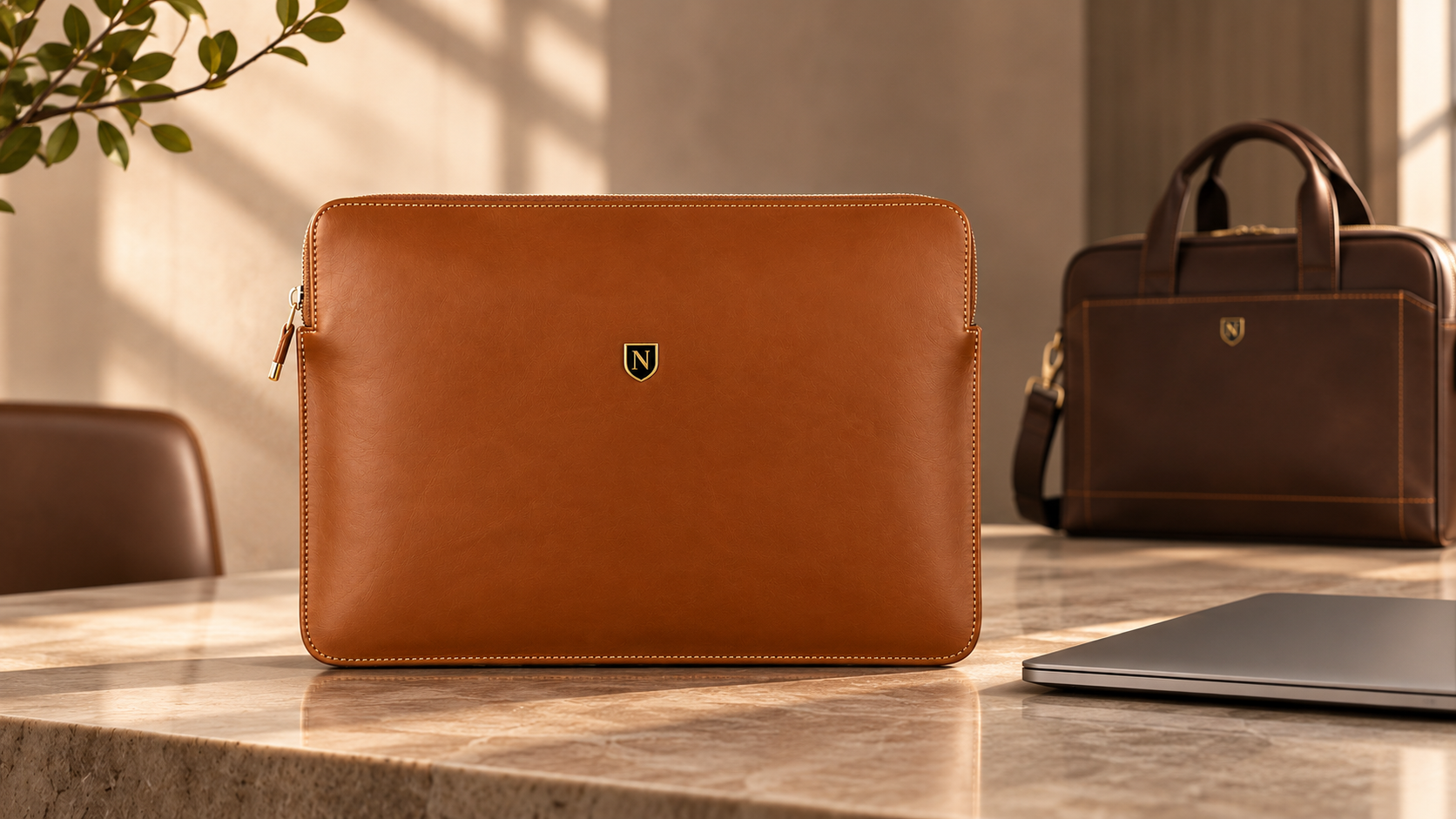
Do You Really Need a Laptop Sleeve? Protection, Fit & Everyday Benefits
Do you really need a laptop sleeve if you already have a backpack? Discover how laptop sleeves help protect against scratches, what to look for in a proper fit, and whether a leather laptop sleeve is worth buying.
A laptop has become an essential part of modern life. From early morning commutes and client meetings to university lectures, cafés and international travel, our devices move with us almost everywhere.
Yet while considerable thought goes into choosing the right laptop, the question of how to carry it is often overlooked.
Do you really need a laptop sleeve, especially if you already own a backpack or laptop bag?
The answer depends on how you use and transport your device, the protection your existing bag provides, and whether you value a more streamlined way to carry your technology.
A well-chosen laptop sleeve can help protect against everyday scratches, surface wear and minor bumps. It also provides a dedicated layer between your laptop and the other objects you carry.
However, not every sleeve offers the same protection, and a sleeve should never be mistaken for a shockproof case.
In this guide, we explore the practical benefits of laptop sleeves, when they are worth using, how they compare with laptop bags, and what to consider when choosing a refined leather laptop sleeve for everyday use.
Do You Need a Laptop Sleeve? The Short Answer
A laptop sleeve is worth considering if you frequently carry your laptop between locations, store it alongside other belongings, or want additional protection against everyday scratches and light contact.
You may benefit from using a laptop sleeve if you:
Carry your laptop inside a backpack without a dedicated protective compartment.
Regularly move between home, the office, meetings and shared workspaces.
Want to prevent keys, chargers and other objects from rubbing against your laptop.
Prefer a slim, lightweight alternative to a conventional laptop bag.
Travel regularly and want to keep your device separate from other belongings.
Value a professional, minimalist way to carry your laptop.
However, a sleeve may be unnecessary if your existing bag already has a well-fitted, sufficiently padded laptop compartment and you rarely transport your device.
The important distinction is that a laptop sleeve provides an additional layer of protection, not complete protection against accidental damage.
What Is a Laptop Sleeve?
A laptop sleeve is a slim, close-fitting cover designed to hold a laptop or tablet without the bulk of a traditional carrying case.
Unlike a laptop backpack or briefcase, which typically accommodates chargers, documents and personal belongings, a laptop sleeve focuses primarily on the device itself.
Laptop sleeves are available in a variety of materials, including:
Neoprene: Flexible, lightweight and commonly used for cushioned sleeves.
Polyester and nylon: Practical textile materials available in numerous constructions and finishes.
Felt: Soft and minimalist, although protection depends on thickness and construction.
Genuine leather: A refined option valued for its natural texture, character and professional appearance.
Structured synthetic materials: Often used in cases designed to provide additional rigidity.
Some sleeves include substantial foam padding, reinforced corners or water-resistant coatings. Others prioritise slimness, elegance and protection from everyday surface contact.
The best choice depends on whether your priority is impact protection, minimal bulk, material quality or a combination of these qualities.
5 Benefits of Using a Laptop Sleeve
1. Protection Against Scratches and Everyday Wear
Even when handled carefully, a laptop can gradually develop scratches and marks through everyday transportation.
Keys, charging adapters, metal pens and other hard objects can come into contact with its exterior when placed in the same compartment.
A properly fitted laptop sleeve creates a physical barrier between the device and surrounding belongings.
This can help reduce:
Surface scratches on the laptop casing.
Scuff marks from repeated contact with other items.
Friction against rough bag linings.
Minor cosmetic wear during regular transportation.
For professionals who regularly move between offices, vehicles and meetings, this simple separation can be particularly useful.
Although a sleeve cannot guarantee that a device will remain pristine, it can help preserve its exterior condition over time.
2. An Additional Layer Against Minor Bumps
A laptop can experience small knocks when a bag is placed on a desk, moved into an overhead compartment or carried through a crowded commute.
A sleeve with appropriate cushioning may help absorb some of the force associated with light everyday contact.
However, the degree of protection varies significantly between designs.
A thin leather sleeve, for example, may provide effective separation from abrasive surfaces without offering the same impact cushioning as a thick, padded protective case.
If your laptop is regularly exposed to demanding travel conditions or an increased risk of being dropped, choose a sleeve or carrying case specifically designed with impact protection in mind.
A laptop sleeve is not a substitute for careful handling or a properly constructed protective bag.
3. Extra Protection Inside a Backpack
One of the most common questions is whether a laptop sleeve is necessary when you already carry a backpack.
The answer depends largely on the backpack's internal design.
Some everyday backpacks have a spacious main compartment but no dedicated laptop section. In these bags, your computer may move against books, accessories and other belongings.
A laptop sleeve can help keep the device separated and reduce direct contact with surrounding objects.
Even when a backpack includes a laptop compartment, a sleeve may offer added scratch protection and make it easier to remove the laptop for use elsewhere.
For professionals who regularly switch between a backpack, briefcase and travel bag, a separate sleeve also provides a consistent way to carry the device.
4. A Slimmer Alternative to a Laptop Bag
Not everyone needs a full-size laptop bag for every occasion.
You may simply be moving from your desk to a meeting room, visiting a nearby café or travelling between floors of the same building.
For these situations, carrying an entire backpack can feel unnecessary.
A slim laptop sleeve provides a more compact solution.
It allows you to carry your computer without the additional size of multiple pockets, shoulder straps and large compartments.
A refined leather design can also complement professional clothing, making it suitable for office environments and client-facing settings.
The appeal is straightforward: carry what you need, without unnecessary bulk.
5. A More Considered Way to Carry Your Technology
Practicality is important, but the objects we use every day also contribute to our personal style.
A laptop is often carried into meetings, placed on conference tables or taken into professional environments where appearance matters.
A carefully selected laptop sleeve can create a more coordinated and intentional presentation.
Black leather offers a restrained, contemporary appearance, while darker brown tones can complement traditional business accessories.
For those who prefer understated design, a minimalist leather laptop sleeve can feel more appropriate than an oversized technology bag.
At NORETI, we believe useful objects should also reflect thoughtful craftsmanship and individual distinction.
Do You Need a Laptop Sleeve if You Have a Backpack?
Not necessarily.
If your backpack already includes a secure, appropriately sized, padded laptop compartment, an additional sleeve may provide only a modest practical benefit.
However, a sleeve becomes more valuable when the backpack lacks adequate internal separation or when the laptop is regularly removed and carried independently.
Before deciding, examine your backpack's laptop storage.
Ask yourself:
Does the laptop sit securely without excessive movement?
Is there sufficient padding around the device?
Is the laptop separated from chargers, keys and other hard objects?
Does the bottom of the compartment provide protection when the bag is placed on the ground?
Is the compartment protected from nearby drink bottles or potential spills?
If several of these features are missing, adding a sleeve may be worthwhile.
For everyday commuting, a combination of a well-designed backpack and a properly fitted sleeve can offer useful flexibility.
The backpack provides carrying comfort and storage capacity, while the sleeve keeps the laptop more securely separated from other belongings.
Laptop Sleeve vs Laptop Bag: What's the Difference?
Although the terms are sometimes used interchangeably, laptop sleeves and laptop bags are designed for different purposes.
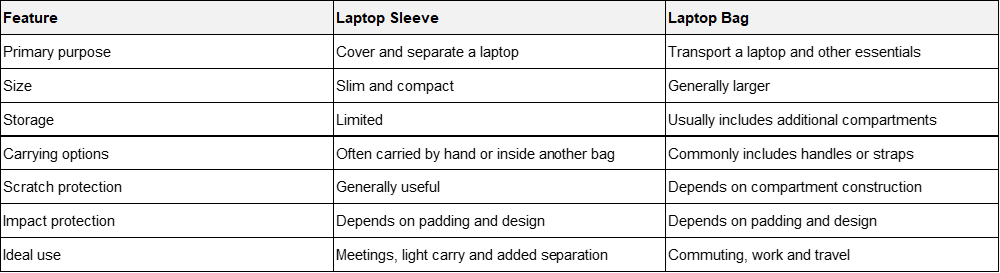
A laptop sleeve is often the better option when simplicity and portability are priorities.
A laptop bag becomes more practical when you regularly carry chargers, documents, headphones, notebooks and other essentials.
For many people, the most useful solution is not choosing one over the other, but using both when the situation requires it.
How to Choose the Right Laptop Sleeve Size
One of the most important considerations when purchasing a laptop sleeve is fit.
An incorrectly sized sleeve may allow excessive movement or place unwanted pressure on the device.
Don't Rely on Screen Size Alone
Laptop sizes are commonly advertised in inches, such as 13-inch, 14-inch, 15-inch or 16-inch.
However, these measurements usually refer to the diagonal display size, not the external dimensions of the entire laptop.
Two laptops advertised as 14-inch models may have noticeably different body dimensions because of their bezels, thickness and overall construction.
This means a sleeve marketed for a 14-inch laptop will not necessarily fit every 14-inch device.
Measure Your Laptop Correctly
Before purchasing, check three measurements:
Width: The external measurement from one side of the laptop to the other.
Depth: The external measurement from the front edge to the back.
Thickness: The height of the laptop when closed.
Compare these measurements with the sleeve's usable internal dimensions rather than relying exclusively on its advertised size.
Remember that external sleeve dimensions may include seams, folds and other construction details that reduce the available interior space.
Should a Laptop Sleeve Be Tight or Loose?
A laptop sleeve should fit snugly enough to limit unnecessary movement while allowing the device to be inserted and removed comfortably.
An excessively tight fit may put pressure on the laptop or make the sleeve difficult to use.
An oversized sleeve may allow the laptop to shift during transportation.
The ideal fit is secure without requiring force.
When in doubt, confirm the product's internal dimensions and compatibility guidance before purchasing.
Are Leather Laptop Sleeves Worth It?
A leather laptop sleeve can be a worthwhile choice for someone who values natural materials, understated design and a professional appearance.
Unlike many conventional fabric sleeves, leather offers a distinctive surface texture and visual character.
Depending on the leather type, finish and use, it may also develop subtle changes in colour and appearance over time.
However, leather should not automatically be considered more protective than other sleeve materials.
A padded textile sleeve may provide better cushioning against impacts than a thin, unpadded leather design.
The advantages of a leather sleeve are often found in the balance between practicality, material character and aesthetics.
What to Look for in a Quality Leather Laptop Sleeve
When comparing leather laptop sleeves, pay attention to:
Leather selection: Consider the type, finish and suitability of the leather.
Interior construction: Look for materials and seams that will not scratch the device.
Fit: Confirm compatibility with your laptop's external measurements.
Edge finishing: Check whether edges are neatly finished and comfortable to handle.
Closure design: Ensure the laptop remains appropriately secured.
Protective construction: Assess padding and reinforcement separately from appearance.
Everyday practicality: Consider whether the sleeve fits inside your existing work bag.
Premium materials are valuable, but the complete construction determines how well a sleeve performs in everyday use.
Introducing the Valmont Leather Laptop Sleeve by NORETI
For those seeking a refined approach to carrying their technology, the NORETI Valmont Leather Laptop Sleeve combines a minimalist silhouette with the natural character of genuine leather.
Crafted from selected top-layer genuine leather, Valmont features an envelope-inspired design, clean lines and understated NORETI shield detailing.
Its slim profile is intended to complement professional and everyday settings without the bulk of a conventional laptop bag.
Designed for many laptops and tablets up to approximately 14 inches, Valmont measures approximately 35.5 × 25.6 × 2 cm.
Its close-fitting construction makes it suitable for carrying independently between meetings or placing inside a compatible briefcase, backpack or travel bag.
Available in three timeless finishes:
Black: Minimalist, contemporary and effortlessly professional.
Dark Coffee: Deep, understated and well suited to classic business accessories.
Cognac Brown: Warm and distinctive, with a naturally expressive appearance.
Beyond laptop storage, its streamlined format also lends itself to carrying slim documents and notebooks.
As with any laptop sleeve, compatibility depends on the device's actual dimensions. The Valmont should be selected for its intended everyday use rather than treated as a drop-proof or waterproof protective case.
Explore the NORETI Leather Laptop Sleeve Collection to discover the Valmont range.
Can a Laptop Sleeve Protect Against Water Damage?
A laptop sleeve may offer limited separation from light moisture, but most standard sleeves should not be considered waterproof.
Protection depends on the material, seams, openings, closure and any water-resistant treatment.
A leather laptop sleeve, in particular, should not be exposed unnecessarily to heavy rain or prolonged moisture.
If you regularly commute in wet conditions, consider using a bag with verified weather-resistant construction and a secure closure.
Keep liquids in a separate compartment and avoid placing a laptop directly beside an unsealed drink bottle.
If a leather sleeve becomes wet, follow the manufacturer's care instructions and allow it to dry naturally away from direct heat.
A laptop sleeve should never be relied upon as the sole defence against liquid damage.
How to Care for a Leather Laptop Sleeve
Proper care can help preserve the appearance and condition of a leather laptop sleeve.
Start with a few straightforward habits.
Keep the surface clean. Remove loose dust using a soft, dry cloth. Avoid abrasive cleaning materials.
Limit moisture exposure. Do not soak the leather or expose it unnecessarily to rain.
Avoid excessive heat. Keep the sleeve away from radiators, heaters and prolonged direct sunlight.
Use appropriate leather-care products. Different finishes require different treatments. Test any recommended product on an inconspicuous area before applying it more broadly.
Avoid overloading. Do not force bulky chargers or accessories into a sleeve designed primarily for a laptop.
Store thoughtfully. When not in use, keep the sleeve in a clean, dry environment without heavy objects placed on top.
Regular, appropriate care is generally more beneficial than aggressive cleaning or excessive conditioning.
Frequently Asked Questions About Laptop Sleeves
Is a laptop sleeve necessary?
A laptop sleeve is not essential for everyone. It is particularly useful when carrying a laptop inside an unpadded bag, transporting it frequently or seeking additional protection against scratches and everyday contact.
If your existing laptop compartment already provides sufficient protection, a sleeve may be optional.
Do laptop sleeves actually protect laptops?
Yes, laptop sleeves can help reduce scratches, scuffs and contact with surrounding objects.
Padded sleeves may also provide some cushioning against minor bumps.
However, protection varies by design, and no ordinary laptop sleeve should be assumed to prevent damage from a significant drop.
Should I use a laptop sleeve inside a backpack?
Using a laptop sleeve inside a backpack can be beneficial when the bag lacks a dedicated padded compartment or when the laptop shares space with other items.
If the backpack already provides adequate padding and separation, the additional benefit may be smaller.
Is it safe to carry a laptop without a sleeve?
Yes, provided the laptop is transported carefully in a suitable protective compartment or case.
A sleeve is an optional accessory rather than a requirement for safe laptop ownership.
Can a 14-inch laptop fit in a 13-inch sleeve?
Not necessarily.
Screen-size labels do not provide enough information to establish compatibility.
Always compare the laptop's external width, depth and thickness with the sleeve's usable interior dimensions.
Is a leather laptop sleeve better than neoprene?
Neither material is universally better.
Leather may appeal to buyers seeking natural texture, a professional appearance and timeless styling.
Neoprene sleeves can offer flexible cushioning and lightweight practicality.
The better choice depends on the sleeve's construction and your personal priorities.
Can I carry a laptop in a sleeve without a bag?
Yes. A suitably designed sleeve can be convenient for short movements between rooms, offices and meetings.
For longer commutes, heavy accessories or demanding travel conditions, a protective laptop bag may be more practical.
Do laptop sleeves help prevent overheating?
A laptop sleeve is intended for transportation and storage, not temperature control.
Avoid using a laptop while it remains inside a sleeve unless the device and sleeve manufacturers explicitly permit it. Covering ventilation areas may interfere with cooling.
Final Verdict: Is a Laptop Sleeve Worth Buying?
For many laptop owners, a sleeve is a simple accessory that can make everyday transportation more considered and convenient.
It helps keep a device separated from surrounding belongings, reduces direct contact with potentially abrasive surfaces and provides a streamlined option for moving between workspaces.
Its value becomes particularly clear for people who commute regularly, carry their laptop in different bags or prefer a minimalist approach to everyday essentials.
Yet a laptop sleeve is not necessary in every situation.
The right choice depends on the protection already provided by your bag, the way you transport your device and the level of impact resistance you require.
A well-chosen sleeve should fit correctly, suit your routine and complement the way you work.
For those who appreciate the natural character of leather and the elegance of understated design, a carefully crafted leather laptop sleeve offers something beyond simple practicality.
It transforms an everyday object into a considered part of your professional essentials.
Because true distinction is often found in the details.
NORETI™ — The Art of Distinction.
Further Reading & References
HP — How to Choose a Laptop Bag: Sleeves, Backpacks and Sizing — Guidance on the different protective functions of laptop sleeves, cases and bags.
NORETI — Backpack vs Briefcase: Which Is Better for Work? — Comparing professional bag styles, laptop compartments, commuting and everyday organisation.
The NORETI Journal — Further guides to leather quality, work accessories, travel and considered design.